[FIX] - the volume control program is not installed
If you get the above message it is because you have for some reason lost your sndvol32.exe file from %WIN_DIR%\SYSTEM32.
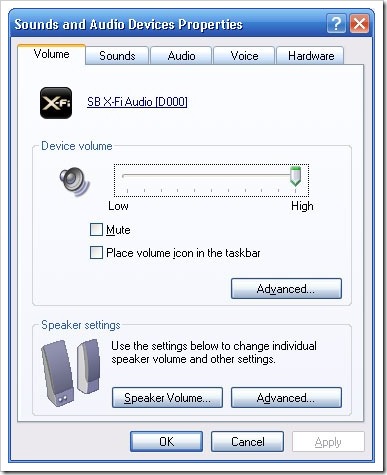
If you do have this problem is is likely that you do not have access to the first Advanced button, which will be greyed out and you will get the error message about the volume control program when you tick the box "Place the volume icon in the taskbar".
And here is how you get it back:
Option 1 - If you have access to another computer running the same Operating System:
Go to another computer running the same version operating system. If you are using Windows XP SP1, go on to another XP SP1 computer, or if you are using a Windows XP SP2 machine go to to another XP SP2 machine etc.
Go to the C:\Windows\System32 folder (this folder may be different for you, the letter at the beginning should be your drive letter). Find a file called sndvol32.exe. Copy this to a network share, CD or a USB memory stick.
Now on the PC with the problem copy this file over to C:\Windows\System32 folder (this folder may be different for you, the letter at the beginning should be your drive letter) and that should fix the problem.
Option 2 - If you don't have access to another computer but you have your original Windows CD (note: not a restore CD):
Browse the CD and locate the I386 folder. In here find sndvol32.ex_. Copy this to your C: (I said C: because it is a lot easier to type in to a command prompt than a long directory).
Open a command prompt (Start > Run > type in cmd and press OK.)
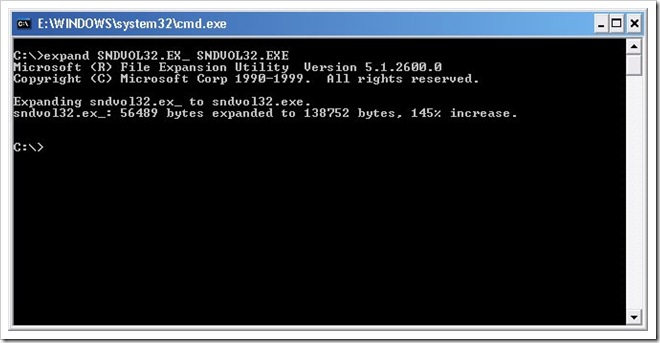
Use the command expand followed by SNDVOL32.EX_ SNDVOL32.EXE. In Explorer copy the SNDVOL32.EXE from the C: to C:\Windows\System32. Problem should be fixed.
Alternatively you can copy it over straight away from the CD using the expand command:
d:
cd i386
expand sndvol32.ex_ c:\windows\system32\sndvol32.exe
Where D: is your CD/DVD drive.
Option 3 - If you don't have another computer or your Windows CD:
You can download the file from RapidShare. Extract the zip and copy the file to your C:\Windows\System32 folder. Problem should be fixed.
I am not sure if this will work for all XP setups. I am sure it should work OK on Home or Professional but I am not sure how interchangeable it is between service packs. But the file hasn't been modified since 2001, so it should be OK for all service packs, but it hasn't been tested.
Microsoft know about this problem. You can read more about it in KB319095.


Comments
stacy
Sun, 2008-05-04 00:32
Permalink
Thank you so much you are
Thank you so much you are awsome!!!!!!!
john
Mon, 2008-05-19 14:32
Permalink
it doesn't woek for me.. it
it doesn't woek for me.. it is showing me an error message like
this: "There are no active mixers devaices available
admin
Mon, 2008-05-19 14:55
Permalink
That means your sound card
That means your sound card isn't installed or it is disabled.
Arpit
Mon, 2008-06-02 10:15
Permalink
hey, can you tell me how i
hey, can you tell me how i can adjust the volume through the
command line? Thanks, A.T.
admin
Tue, 2008-06-03 22:05
Permalink
@ Arpit, No idea if you can.
@ Arpit,
No idea if you can. I have never seen anything relating to doing anything with the sound at the command prompt. Just use the volume controls.
Brian
Fri, 2008-07-04 03:31
Permalink
Worked immediately...much
Worked immediately...much more helpful then the other websites I
had previously visited for this problem
admin
Sat, 2008-07-05 10:24
Permalink
@ Brian, Glad to be of help,
@ Brian,
Glad to be of help, hope you enjoy making your music louder.
Danilo
Tue, 2008-08-26 13:28
Permalink
Thank you so much!!! I used
Thank you so much!!! I used option 3 and worked perfectly!!!!
Sally
Fri, 2008-08-29 03:31
Permalink
Thank you so much. Option 3
Thank you so much. Option 3 worked for me.
Dezi
Fri, 2009-09-18 20:03
Permalink
Omg!! It worked! Omg thank
Omg!! It worked! Omg thank you so much! option 3 worked! I was really getting tired of having to go into control panel to adjust the volume, but yeah now I got the volume control in the TaskBar. I LOVE YOU!
Thom
Fri, 2010-10-08 19:07
Permalink
This is great so easy to do -
This is great so easy to do - THANK YOU SO MUCH for publishing this
priya
Sat, 2010-11-13 07:51
Permalink
Thank u so much it worked
Thank u so much it worked
Dave
Mon, 2010-12-06 08:57
Permalink
Thx option 1 worked for
Thx option 1 worked for me.....
Greg
Sun, 2011-01-02 06:08
Permalink
James, Thank you for the
James,
Thank you for the simple solution. Option 3 worked immediately. And no fuss!
Abhishek
Fri, 2011-01-07 11:06
Permalink
It works. Thanks
It works. Thanks
Anonymous
Mon, 2011-01-17 23:48
Permalink
thanks
thanks alot man its work
Anonymous
Tue, 2011-03-01 17:03
Permalink
Volume control icon
Thank you! Pulling it from disc worked.
Anonymous
Wed, 2011-05-25 01:52
Permalink
Did'nt want to reach for
Did'nt want to reach for Windows cd right behind my back, so I tried this, worked instantly on xp home, sp3, word up sir!
Anonymous
Sun, 2011-06-19 00:49
Permalink
Thank You SOOO much!
Thank You SOOO much!
Anonymous
Sat, 2011-08-20 18:18
Permalink
Thanks a lot
Option 3 worked perfectly. Thank you.
Anonymous
Sun, 2011-10-16 01:55
Permalink
option number three worked.
option number three worked. thanksssssssssssssssss :)
Anonymous
Mon, 2011-12-12 21:53
Permalink
Works!! Thank You!!!
Downloaded the file & put it in win\sys32 & it worked perfectly!!!!!
Nishanth
Tue, 2012-05-29 02:25
Permalink
Volume Control Program
Good job,This solution works great for me.Thank You :)