[FIX] UT3.exe - kernel32.dll - Unreal Tournament 3
If you are getting the following error message when you open Unreal Tournament 3 do the following steps which should stop the problem happening.

If you do get this error, the first thing to do is to download and install the latest graphics drivers for your graphics card. I am assuming that you have checked the minimum specification of the game and your computer to make sure your PC can handle it.
To find out what graphics card you have, press Start > Run. Type in dxdiag.
Click Yes on the message that appears.
On the Display tab, make note of the name at the top left.
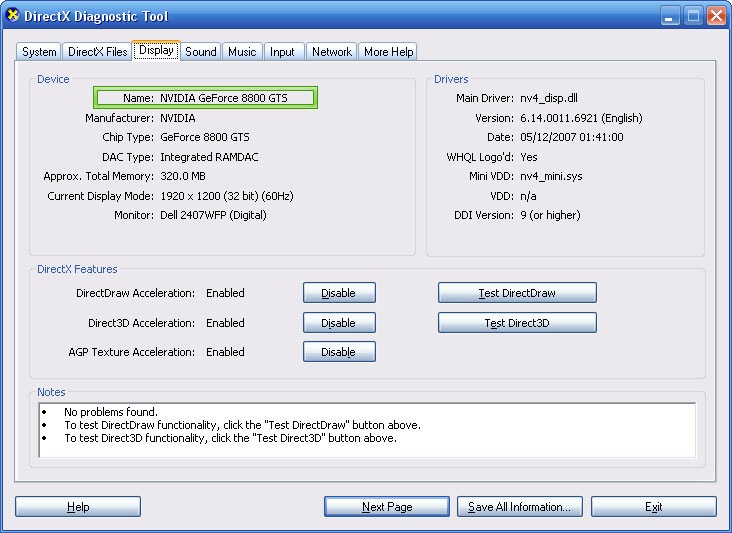
There are 3 likely manufactures that you will be using. Nvidia, ATi (now called AMD) or Intel.
The first 2 are the most likely.
Go to the website of your graphics card manufacture and download the lastest drivers for your series of graphics card and operating system.
Once downloaded. Go to Control Panel > Add or Remove Programs. Remove your old graphics card drivers, and only your graphics card drivers. If you have an Nvidia graphics card and an nForce motherboard, only remove the display drivers.
Once the uninstallation has completed, restart. Once restarted, install the drivers that you just downloaded beforehand.
Once the installation has finished, restart. Set up your screen resolution again if it isn't detected properly.
Now try to run Unreal Tournament 3. If it still doesn't work, you can try reinstalling the game. If that doesn't work, head over to the Epic forums.
Note: There are 2 patches out for Unreal Tournament 3. 1.1 and 1.2. I don't think you need 1.1 installed to install 1.2.
Download 1.2 (Latest)


Comments
Tristian
Thu, 2008-10-16 19:57
Permalink
Hi I had this same issue but
Hi I had this same issue but I found a different fix for it
I'm running Windows Vista Ultimate x64 SP1
Graphics card is a Radeon 4850
the game ran fine then started to crash everytime it loaded but other games ran fine. The last thing I noticed was that Windows and Ati CCC seemed to think I had 2 monitors even though I only had one so I removed both monitors from device manager and also removed the graphics adapter from device manager and rebooted a couple of times after it had installed the drivers again.
This has solved my problem and I can recreate the problem and solve it in the same way I hope this helps someone...
Max
Sun, 2009-07-05 19:05
Permalink
Help! I have
Help! I have Intel(R)82195G/GV/910GL Express chipset family, and I don't understand what to do!
Jur...
Mon, 2009-07-06 22:29
Permalink
I got the same problem. my
I got the same problem. my video card is an Mobile Intel(R) 945 Express Chipset Family. my card is updated to the max and it still wont work.
Mike
Fri, 2009-07-10 13:23
Permalink
I updated my driver still
I updated my driver still crashing on splash screen. I have ATI Radeon HD 4800 series and I do not have windows vista I have Xp professional. Someone HELP!
admin
Fri, 2009-07-10 16:00
Permalink
Make sure DirectX is up to
Make sure DirectX is up to date. Contact Epic if it continues.
Dotz
Mon, 2010-05-31 00:22
Permalink
I have ATI radeon hd 2400 xt.
I have ATI radeon hd 2400 xt. I think getting the catalyst might have solved it, but thing is, it wasn't crashing, it would just refuse to start a game when I try to get one going...
Alexander
Wed, 2010-09-29 10:17
Permalink
i have the same problem, but
i have the same problem, but game sometimes works , sometimes does not. i think it's because of custom characters as i have installed FactionUI from Epic Games Forums. it seems this addon doesn't work well, in other words, some characters work fine, others don't. for example,
there's a character (in FactionUI) called Spectri, i have more that 10 this 'Spectries', when i choose to play this character, game crashes. so, with lots of characters game often crashes. after reinstall ut3 works fine, but should i
add lots of maps, characters and so on, game might
(and often crashes, but not always!!, sometimes it works just fine ) crash. it seems when computer loads characters
he chooses them randomly, so when it happens so he chose
working characters, game works fine, but if at least one
of the character he chose is troublesome(
damaged or corrupted files or there were mistakes while writing this files or null pointers or ...) game crashes.
so, to resolve this problem, i think, you should add new characters one by one to find out which one(ones) of them are causing trouble. i have over 900(!) maps, they work just fine ( if you are lucky(when it happens so..)). so, my verdict is FactionUI characters contain errors.