Jul200921

780G chipset sound output through HDMI

I had a few issues with my HTPC where the sound only came out as stereo on my Sony STR-KS1300.

All drivers were installed correctly and the onboard sound was disabled.

But when viewing the supported formats for the playback device, it only listed 2 channels. Unfortunately I have been unable to change this, although I have got full 5.1 DTS and DD sound coming through to the receiver, by selecting S/PDIF pass-through in all the applications (even through I was using HDMI, not optical). The only problem with this is music comes through stereo only as WMP doesn’t pass-through stereo sound through as 5.1 in anyway and foobar doesn’t support pass-through, although there is a component you can download, but this wouldn’t work for my sound card as I think the DVD-A disc rips are 6 channel rather than 2.

I think the only way of getting proper 5.1 surround sound out of music, will be to buy another sound card and use another audio input in to the receiver.

Driver wise, I used the latest Catalyst package (9.6) and the Realtek ATi HDMI Audio driver (2.28). At this point I would also like to point out that the download speed from Realtek is diabolical. I ended up getting the filename of the file and searching on Google to find a mirror. Don’t be fooled by the other driver download sites, as they just directly link to the Realtek driver rather than a proper mirror.

Jul200920

HTPC resetup using Windows 7 and MCE

From my previous post about building my HTPC and configuring the HTPC using MediaPortal, I have now changed my setup software wise.

Read the rest of this entry »

Apr200921

Command prompt and regedit fail to open and restart explorer.exe

On a Windows XP SP2 machine I have had, both the command prompt (cmd.exe) and regedit (regedit32.exe) failed to load and just restarted explorer.exe which closed all open windows and brought you back to the desktop. This also brought up the Restore Active Desktop message on the desktop and the Restore button failed with a script error.

On most start ups, explorer didn’t load at all, but could be manually by bringing up the task manager (Ctrl + Alt + Delete) and going to File –> Run and typing ‘explorer.exe’ (without the quotes).

I don’t know where the malware came from, but there were traces from Limewire, so one could hazard a guess that this was likely the cause.

Read the rest of this entry »

Apr200920

“HTTP request status” in Drupal 6.x on localhost

I just set up XAMPP on my Vista x64 PC and found that after installing Drupal 6 that the status report was throwing up an error.

HTTP request status

Your system or network configuration does not allow Drupal to access web pages, resulting in reduced functionality. This could be due to your webserver configuration or PHP settings, and should be resolved in order to download information about available updates, fetch aggregator feeds, sign in via OpenID, or use other network-dependent services.

It took a while to find the solution, but I eventually found it on drupal.org. The solution was posted by mrSjoerd.

  1. Open up the hosts file which is located at C:\Windows\System32\drivers\etc in notepad
  2. You should find a line like the following at the bottom:
    ::1             localhost
  3. Add a # in front of it to make it look like this:
    #::1             localhost
  4. Save the file and close notepad.
  5. Refresh the status page in Drupal and the error should be gone.  This should work without a restart, but if it doesn’t work without a restart it is worth a try.
Oct200831

Another spammer – 65.94.2.210

Another spammer caught in action.

Some others that have come up:

  • 94.102.60.43
  • 94.102.60.77
  • 94.102.60.39
Oct200826

Built my first HTPC (Home Theatre Personal Computer)

The idea of an HTPC is to have a PC that can fit in with your amplifier/receiver underneath your TV which will act as a DVD player but with more features.

Hardware wise it is identical to a normal PC with CPU, RAM, motherboard etc etc but generally put in to more stylish cases specially built to fit in most TV stands.

Case

I opted for an Antec Fusion Black HTPC case which is a fairly nice case, although it can be seen as quite costly at around £100 without a PSU. The case is steal with an aluminium front but even so it doesn’t weigh alot. There is space for 2 hard drives which are secured with rubber grommets to stop vibration and 2 5.25″ slots with one of these slots being used for the LCD display that comes built with the case, but can be taken out. The case has a few ventilation holes around to keep components cool but only has 2 120mm fans which are located on the side of the case near where the CPU will be. Both of these fans are Antec Tri-Cools and as such have the 3 way setting for fan speed, low, medium, high. I have mine set to low which gives off a little bit of noise and gives more than adequate cooling for the rest of the components.

Motherboard

After reading many good reviews I bought the Gigabyte GA-MA78GM-S2H AMD 780G Micro-ATX. The GA-MA78GM-S2H uses the AMD 780G chipset which has onboard audio and graphics. The onboard audio is a Realtek chip with your standard analogue in and outs but also has a digital out. The onboard graphics is called the Radeon HD 3200 which is said to be equal in performance to the Radeon HD 3450. The HD 3200 has AVIVO and allows for full hardware acceleration if the software supports it. The HD 3200 gives you VGA, DVI and HDMI which also carries sound. The motherboard also has a feature called Hybrid Graphics Technology. This allows you to put in another graphics card in to the PCI-e 2.0 slot which will be used in a crossfire like situation although AMD refuses to call it crossfire due to the performance levels not being the same. Unfortunately you can just shove any card in there and get this performance. It is obviously limited to AMD/ATi cards only and even then it will only use the power equivalent to the onboard graphics. In this case the best card to put in would be the HD 3450.

CPU

Keeping to an all AMD affair, I got the AMD Athlon X2 4850e which is a low power CPU said to consume only 45W. This also reduces heat which is a top priority in an HTPC as it means you don’t need a noisy fan on it, and this CPU is more than capable of processing any HD media or x264 rips.

RAM

RAM isn’t used that much in an HTPC compared to a gaming PC so I just got 2GB (2x 1GB sticks) of Corsair DDR2 XMS2 PC2-6400C5 TwinX. Of course you can easily change this to 4GB if you want.

PSU

As I was happy with my current Corsair PSU in my gaming PC I chose to keep my loyalty and got the Corsair CX400W which is more than capable of powering the HTPC with room to spare if I ever wanted to add a new sound card or new graphics card.

Hard drive

Being a Samsung fan due to the low noise from their Spinpoint harddrives, I bought another Samsung SpinPoint F1 500GB to join my growing collection of them. This drive isn’t particularly slow, but obviously won’t keep up with a Western Digital Raptor but is a hell of a lot quieter. This only used up 1 slot, so I still have another slot spare to add another drive in the future if I wanted to.

DVD Drive

Originally I was just going to buy a £20 DVD drive. But then I saw the LG GGC-H20L Blu-Ray Reader & HD-DVD ROM. For only £45 more I now have the ability to play Blu-Ray and HD-DVD. Although HD-DVD has been beaten by Blu-Ray there is still a lot of HD-DVD stock out there with stores trying to get rid of it. So when you have the choice of getting HD films for as little as £3 it seemed obvious to get a dual player. The only thing I forgot to check about this drive before purchasing was the noise, but I was gladly surprised with in once it was installed. Although not quiet, it wasn’t too noticeable, so when you have a film on you are unlikely to hear it.

Software

At the moment, I don’t have any dedicated software for my HTPC but I have got Windows Vista Home Premium 64-bit to install, then I can test with further software to expand the HTPC to be the optimum it can be.

Oct200824

Spam from 93.174.93.89

One of the sites I look after is getting a lot of spam from 93.174.93.89 with messages being posted like below:
comment2, http://www.ipetitions.com/petition/d34w79rvw Clitorus sex site, fgx, http://www.ipetitions.com/petition/d34w254d5 Clitoris sex site, :), http://www.ipetitions.com/petition/d34woxbl0 Clits major size sex, 02056, http://www.ipetitions.com/petit

and
comment4, http://www.ipetitions.com/petition/d34w76t2e Clothed sex movies free, 385, http://www.ipetitions.com/petition/d34w0mtv2 Clothed sex party, :-((, http://www.ipetitions.com/petition/d34wv876u Clothed sex pic free, %P, http://www.ipetitions.com/

The site has both Akismet and Project Honey Pot protecting it and isn’t detected by either.

Add to the ban list.

Other IPs that have been spamming the site alot are:

78.110.175.15
94.102.60.43
94.102.60.77
94.102.60.39

Sep200802

Google Chrome really Safari in disguise?

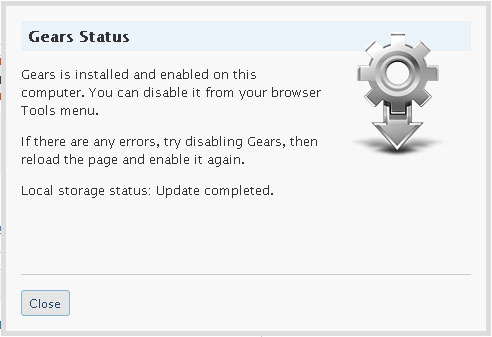
While enabling Google Gears from within the newly released Google Chrome, I noticed something odd about the wording.

In Firefox and IE, you get the same text:

Make note of the first paragraph. Now if you open up the same javascript window within Google Chrome, you get this:

Once again, note the first paragraph again.  Within Google Chrome it mentions the Safari menu. Safari is not installed on this computer so there is no reason for Safari to appear there other than Google Chrome being related to Safari in some way.

Also take note that yesterday, typing Google Chrome in to Google search, the results were very different.  In less than 1 day Google appears to have got it’s Chrome site to #1.